 Français
  English
 - Posts: 69
- Thank you received: 0
Résolution de problème : merci de consulter la FAQ et le Wiki
Aidez-nous à améliorer le contenu du Wiki et de la FAQ en les consultant. Le Wiki est mis à jour régulièrement et la FAQ permet une résolution rapide des principales embûches rencontrées. N'hésitez pas à nous faire parvenir vos suggestions d'amélioration sur le forum ou à éditer directement le Wiki ou la FAQ .
ArtNet problems
- NachoL
- Topic Author
- Offline
Less
More
1 year 4 months ago #28264
by NachoL
ArtNet problems was created by NachoL
I can't get ArtNet working with DLight, I Have two Nodes and none is working, Computer (macOSX) recognizes the Lan, DLight recognizes the IP but the universes doesn't show. I think is something about the Mask but I just can not get it. Could Someone help me configuring this? Shall I upload pictures or a video of my set-up and steps I make Here?
Thanx a Lot, I have a gig in Germany and I need 4 Universes but I can not Afford to buy a new node, I really would appreciate if I can make this ones work
Thanx a Lot, I have a gig in Germany and I need 4 Universes but I can not Afford to buy a new node, I really would appreciate if I can make this ones work
Please Log in to join the conversation.
- sl1200mk2
-

- Offline
Less
More
- Posts: 11631
- Thank you received: 1064
1 year 4 months ago #28265
by sl1200mk2
nicolas
Replied by sl1200mk2 on topic ArtNet problems
Hi,
in Artnet, the network card of your computer needs to be in the same IP area of the nodes.
generally node are set as 2.0.0.1, 2.0.0.2 etc... with a netmask like 255.0.0.0
so you need to configure your card as 2.0.0.100 (another IP) and a netmask like 255.0.0.0
once it's done in the setup/artnet, in the output part you select the network card of your computer and click on 'who's online'.
each present node should respond.
++
in Artnet, the network card of your computer needs to be in the same IP area of the nodes.
generally node are set as 2.0.0.1, 2.0.0.2 etc... with a netmask like 255.0.0.0
so you need to configure your card as 2.0.0.100 (another IP) and a netmask like 255.0.0.0
once it's done in the setup/artnet, in the output part you select the network card of your computer and click on 'who's online'.
each present node should respond.
++
nicolas
Please Log in to join the conversation.
- NachoL
- Topic Author
- Offline
Less
More
- Posts: 69
- Thank you received: 0
1 year 4 months ago #28268
by NachoL
Replied by NachoL on topic ArtNet problems
I share two screen captures. The Node shows as connected, Nodes IP is 2.0.0.101. I setup 2.0.0.102 in net preferences and the subtask 255.0.0.0. The IP appears in DLight, but when I check who's online nothing is happening. Same beaheviour with two different ArtNet node hardware


Please Log in to join the conversation.
- sl1200mk2
-
- Offline
Less
More
- Posts: 11631
- Thank you received: 1064
1 year 4 months ago #28270
by sl1200mk2
nicolas
Replied by sl1200mk2 on topic ArtNet problems
What kind of node is it?
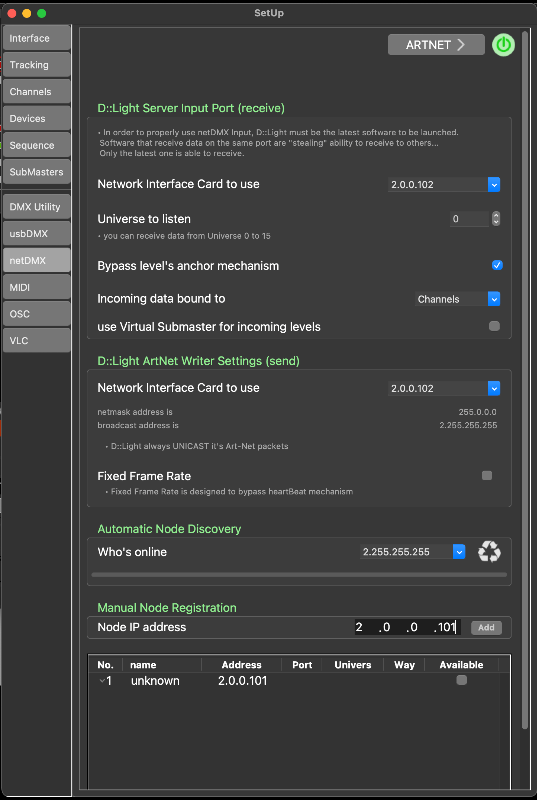
of you know for sure that the IP is 2.0.0.101, just write it in the manual registration and click on 'add'
++
of you know for sure that the IP is 2.0.0.101, just write it in the manual registration and click on 'add'
++
nicolas
Please Log in to join the conversation.
- NachoL
- Topic Author
- Offline
Less
More
- Posts: 69
- Thank you received: 0
1 year 4 months ago #28272
by NachoL
Replied by NachoL on topic ArtNet problems
yes, I also tried the 101, when I write 101 this banner shows up, saying that another web device is using this IP

Please Log in to join the conversation.
- sl1200mk2
-
- Offline
Less
More
- Posts: 11631
- Thank you received: 1064
1 year 4 months ago #28273
by sl1200mk2
nicolas
Replied by sl1200mk2 on topic ArtNet problems
Not here... at the bottom of the artnet's setup page of DL
nicolas
Please Log in to join the conversation.
- NachoL
- Topic Author
- Offline
Less
More
- Posts: 69
- Thank you received: 0
1 year 4 months ago #28275
by NachoL
Replied by NachoL on topic ArtNet problems
this is a home made Device made by a very good technician. It's tested and working in several computers wit Grand MA and Avolites
I also tried the Showtec NET-8/5 with the same results
I also tried the Showtec NET-8/5 with the same results
Please Log in to join the conversation.
- NachoL
- Topic Author
- Offline
Less
More
- Posts: 69
- Thank you received: 0
1 year 4 months ago #28276
by NachoL
Replied by NachoL on topic ArtNet problems
yes, I tried that, but nodes are still not showing
Please Log in to join the conversation.
- sl1200mk2
-
- Offline
Less
More
- Posts: 11631
- Thank you received: 1064
1 year 4 months ago #28277
by sl1200mk2
nicolas
Replied by sl1200mk2 on topic ArtNet problems
In my opinion it's a mistake of the nodes to not respond an artPoll reply to the caller....
Your last picture is OK, click then on available and you should be able to use it.
++
Your last picture is OK, click then on available and you should be able to use it.
++
nicolas
Please Log in to join the conversation.
- aroom
-

- Offline
1 year 4 months ago #28278
by aroom
Replied by aroom on topic ArtNet problems
hello
if you are on macOS sequoia make sure that the Privacy > Local Network toggle is on for DLight
if it's on toggle it off and on again
if you are on macOS sequoia make sure that the Privacy > Local Network toggle is on for DLight
if it's on toggle it off and on again
Please Log in to join the conversation.
- NachoL
- Topic Author
- Offline
Less
More
- Posts: 69
- Thank you received: 0
1 year 4 months ago #28279
by NachoL
Replied by NachoL on topic ArtNet problems
Ok, thanx a lot. I'll Try it!
Please Log in to join the conversation.
- aroom
-
- Offline
1 year 4 months ago - 1 year 4 months ago #28280
by aroom
Replied by aroom on topic ArtNet problems
I'm not sure it's gonna help, but a dev from QLab told me that some people were having issue with this...
Last edit: 1 year 4 months ago by aroom.
Please Log in to join the conversation.
- NachoL
- Topic Author
- Offline
Less
More
- Posts: 69
- Thank you received: 0
1 year 4 months ago #28281
by NachoL
Replied by NachoL on topic ArtNet problems
Just universe 1 is working, The other 3 don't
Please Log in to join the conversation.
- NachoL
- Topic Author
- Offline
Less
More
- Posts: 69
- Thank you received: 0
1 year 4 months ago #28282
by NachoL
Replied by NachoL on topic ArtNet problems
Thanx, hope to find a solution
Please Log in to join the conversation.
- sl1200mk2
-
- Offline
Less
More
- Posts: 11631
- Thank you received: 1064
1 year 4 months ago #28283
by sl1200mk2
nicolas
Replied by sl1200mk2 on topic ArtNet problems
in setUp/dmxUtility, you need to tell how many universe you want to work with.
tell me if it's ok (an please post a picture of your hand made node)
++
tell me if it's ok (an please post a picture of your hand made node)
++
nicolas
Please Log in to join the conversation.
Time to create page: 0.198 seconds