 Français
  English
 - Posts: 6
- Thank you received: 0
Résolution de problème : merci de consulter la FAQ et le Wiki
Aidez-nous à améliorer le contenu du Wiki et de la FAQ en les consultant. Le Wiki est mis à jour régulièrement et la FAQ permet une résolution rapide des principales embûches rencontrées. N'hésitez pas à nous faire parvenir vos suggestions d'amélioration sur le forum ou à éditer directement le Wiki ou la FAQ .
Submaster not acting on MIDI input
- Woodencup
- Topic Author
- Offline
Less
More
8 months 3 weeks ago #29293
by Woodencup
Submaster not acting on MIDI input was created by Woodencup
I've tried many things but it seems MIDI CC control stopped working.
I have several MIDI CC connected to Channels and Submasters etc. but it stopped working completely.
MIDI input works. DLight recieves midi just fine.
It may have something to do with the "Extended MIDI patch for incomming CC" toggle I tried once. When turned on it gives you "lowbound, highbound and mode" options and with the toggle off none of these options.
Now, with the toggle turned off I still get the Lowbound etc. options and I cant get rid of it. Worse, nothing works anymore!
I've tried exporting the MIDI switch to an XML and it shows no Lowbound etc options in the XML. Importing it in a new sho file seems to work. But I need it to work in my original sho file! How can I get it back to working again?
Is this a bug? Can anyone help me?
Thanks, Theo
I have several MIDI CC connected to Channels and Submasters etc. but it stopped working completely.
MIDI input works. DLight recieves midi just fine.
It may have something to do with the "Extended MIDI patch for incomming CC" toggle I tried once. When turned on it gives you "lowbound, highbound and mode" options and with the toggle off none of these options.
Now, with the toggle turned off I still get the Lowbound etc. options and I cant get rid of it. Worse, nothing works anymore!
I've tried exporting the MIDI switch to an XML and it shows no Lowbound etc options in the XML. Importing it in a new sho file seems to work. But I need it to work in my original sho file! How can I get it back to working again?
Is this a bug? Can anyone help me?
Thanks, Theo
Please Log in to join the conversation.
- sl1200mk2
-

- Offline
Less
More
- Posts: 11631
- Thank you received: 1064
8 months 3 weeks ago #29297
by sl1200mk2
nicolas
Replied by sl1200mk2 on topic Submaster not acting on MIDI input
Hi Theo,
two things (in order) :
- can you come on Discord and test DL 4524_b27, things may have been fixed (invite is here getdlight.com/forum/free-talk/7683-discord#25199 )
- can you post your sho that I can have a look
++
two things (in order) :
- can you come on Discord and test DL 4524_b27, things may have been fixed (invite is here getdlight.com/forum/free-talk/7683-discord#25199 )
- can you post your sho that I can have a look
++
nicolas
Please Log in to join the conversation.
- Woodencup
- Topic Author
- Offline
Less
More
- Posts: 6
- Thank you received: 0
8 months 3 weeks ago #29298
by Woodencup
Replied by Woodencup on topic Submaster not acting on MIDI input
I'll try it.
Here's the sho file
Here's the sho file
Please Log in to join the conversation.
- Woodencup
- Topic Author
- Offline
Less
More
- Posts: 6
- Thank you received: 0
8 months 3 weeks ago #29301
by Woodencup
Replied by Woodencup on topic Submaster not acting on MIDI input
I've tested the b27 version and it looks like the extended midi patch options are gone but Midi CC still doesn't work. I think maybe the sho file is also the problem.
theo
theo
Please Log in to join the conversation.
- sl1200mk2
-
- Offline
Less
More
- Posts: 11631
- Thank you received: 1064
8 months 3 weeks ago #29302
by sl1200mk2
nicolas
Replied by sl1200mk2 on topic Submaster not acting on MIDI input
Hi,
I've tested your sho here and it works.
don't you have a midi loop somewhere? (Midi Monitor that is sending back Midi messages to DLight).
also you could monitor what does your interfaces are sending thanks to Protokol
hexler.net/protokol
++
I've tested your sho here and it works.
don't you have a midi loop somewhere? (Midi Monitor that is sending back Midi messages to DLight).
also you could monitor what does your interfaces are sending thanks to Protokol
hexler.net/protokol
++
nicolas
Please Log in to join the conversation.
- Woodencup
- Topic Author
- Offline
Less
More
- Posts: 6
- Thank you received: 0
8 months 3 weeks ago #29308
by Woodencup
Replied by Woodencup on topic Submaster not acting on MIDI input
It's not midi. I'm sending it from qLab and dlight receives it no problem. The midi spy sees the data. And when making a new sho file, it works fine. I think it's related to the extended midi toggle. Somehow something remembers it was ones on.
Also, the b27 version now does displays the extended midi options (lowbound,hibound etc) while the toggle is off.
I guess right now my option is to build a new sho file from the ground up..
theo
Also, the b27 version now does displays the extended midi options (lowbound,hibound etc) while the toggle is off.
I guess right now my option is to build a new sho file from the ground up..
theo
Please Log in to join the conversation.
- Woodencup
- Topic Author
- Offline
Less
More
- Posts: 6
- Thank you received: 0
8 months 3 weeks ago #29309
by Woodencup
Replied by Woodencup on topic Submaster not acting on MIDI input
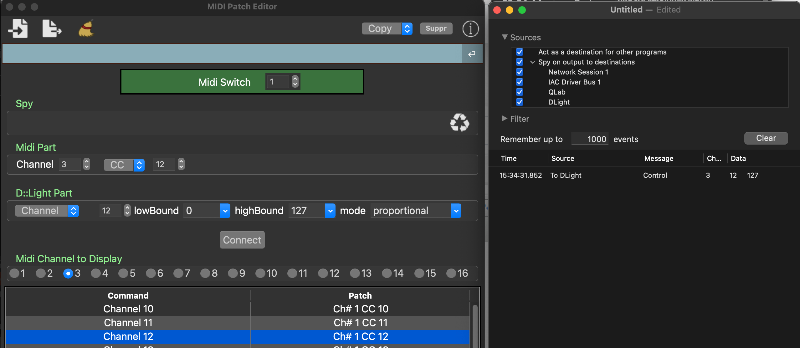
Here is my midi monitor all i/o selected. This is what happens in midi land.
Midi is turned on in dlight, ch3 CC12 is patched to Submaster12, extended midi toggle is off
Midi is turned on in dlight, ch3 CC12 is patched to Submaster12, extended midi toggle is off
Please Log in to join the conversation.
- sl1200mk2
-
- Offline
Less
More
- Posts: 11631
- Thank you received: 1064
8 months 3 weeks ago #29310
by sl1200mk2
nicolas
Replied by sl1200mk2 on topic Submaster not acting on MIDI input
I think I got it.
controlling Midi via other software means that there's could be no reference. this is the purpose of 'bypass level's anchor mechanism' in setUp/Midi
set it to ON and it should be ok
++
controlling Midi via other software means that there's could be no reference. this is the purpose of 'bypass level's anchor mechanism' in setUp/Midi
set it to ON and it should be ok
++
nicolas
Please Log in to join the conversation.
- Woodencup
- Topic Author
- Offline
Less
More
- Posts: 6
- Thank you received: 0
8 months 3 weeks ago #29311
by Woodencup
Replied by Woodencup on topic Submaster not acting on MIDI input
Yes! thank you! Saves me a lot of work!
theo
theo
Please Log in to join the conversation.
- sl1200mk2
-
- Offline
Less
More
- Posts: 11631
- Thank you received: 1064
8 months 3 weeks ago #29312
by sl1200mk2
nicolas
Replied by sl1200mk2 on topic Submaster not acting on MIDI input
no doubt...
option is ON by default. but mixing software control and hardware control of your Sub could lead to Sub jumps...
++
option is ON by default. but mixing software control and hardware control of your Sub could lead to Sub jumps...
++
nicolas
Please Log in to join the conversation.
Time to create page: 0.194 seconds