 Français
  English
 - Posts: 69
- Thank you received: 0
Résolution de problème : merci de consulter la FAQ et le Wiki
Aidez-nous à améliorer le contenu du Wiki et de la FAQ en les consultant. Le Wiki est mis à jour régulièrement et la FAQ permet une résolution rapide des principales embûches rencontrées. N'hésitez pas à nous faire parvenir vos suggestions d'amélioration sur le forum ou à éditer directement le Wiki ou la FAQ .
DLIGHT 4.5.17 doesn't minimize in the dock
- NachoL
- Topic Author
- Offline
Less
More
1 year 4 months ago - 1 year 4 months ago #28378
by NachoL
DLIGHT 4.5.17 doesn't minimize in the dock was created by NachoL
...I don't know how to explain it in English but the new D:light version doesn't go away from the desktop. when you try ti minimize it it jumps back
Last edit: 1 year 4 months ago by NachoL.
Please Log in to join the conversation.
- sl1200mk2
-

- Offline
Less
More
- Posts: 11631
- Thank you received: 1064
1 year 3 months ago #28379
by sl1200mk2
nicolas
Replied by sl1200mk2 on topic DLIGHT 4.5.17 doesn't minimize in the dock
Hi,
nice catch... I'll try to deal with that.
(another thing, does your home made artNet box respond fine to who's online ?)
++
nice catch... I'll try to deal with that.
(another thing, does your home made artNet box respond fine to who's online ?)
++
nicolas
Please Log in to join the conversation.
- NachoL
- Topic Author
- Offline
Less
More
- Posts: 69
- Thank you received: 0
1 year 3 months ago #28380
by NachoL
Replied by NachoL on topic DLIGHT 4.5.17 doesn't minimize in the dock
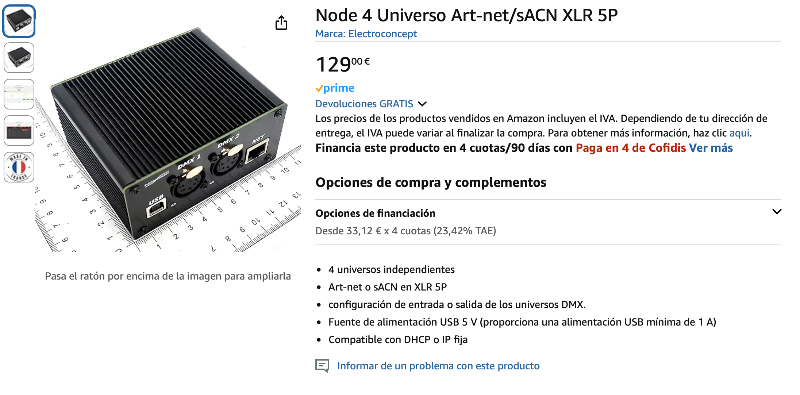
Yes! the home made worked fine and I bought another one another one in amazon (I had to give it back). It's a French company called electroconcept. I send a picture here in case somebody is interested Very good price and it also works fine. I had quite some issues in theaters with the fixed frame rate and the DMX Output rate. Leds were "shaking" in a slow strobe way. I could figure it out, it took me a while.
I'm a bit confused with the last update, now after who's online Dlight also appears in the check box under do I have to check it? or just the node? before the update just the node appeared, and it worked fine
but yes, everything is working
I'm a bit confused with the last update, now after who's online Dlight also appears in the check box under do I have to check it? or just the node? before the update just the node appeared, and it worked fine
but yes, everything is working
Please Log in to join the conversation.
- NachoL
- Topic Author
- Offline
Less
More
- Posts: 69
- Thank you received: 0
1 year 3 months ago #28381
by NachoL
Replied by NachoL on topic DLIGHT 4.5.17 doesn't minimize in the dock
I put DMX output rate in high, is it better this way? can someone explain how to know if I need to put it in medium or low?
Thanx
Thanx
Please Log in to join the conversation.
- sl1200mk2
-
- Offline
Less
More
- Posts: 11631
- Thank you received: 1064
1 year 3 months ago #28383
by sl1200mk2
nicolas
Replied by sl1200mk2 on topic DLIGHT 4.5.17 doesn't minimize in the dock
hello,
>I'm a bit confused with the last update, now after who's online Dlight also appears in the check box under do I have to check it? or just the node? before the update just the node appeared, and it worked fine
yes... I'll need to dissect a little bit more to trim answers from DLight when it's on the same computer (you can receive artNet from another DLight on another computer).
>I put DMX output rate in high, is it better this way? can someone explain how to know if I need to put it in medium or low?
standard DMX speed is 44fps... but it's hard to compute exactly...
50fps is high DMX speed which means more DMX frame per second, which in turn means more CPU usage...
grandMA is doing 33fps, so I did the same and did not noticed any visual lag.
25fps is designed for some Wifi-DMX boxes (electroconcept's ones)
I would suggest to stick with 33fps aka Medium
++
>I'm a bit confused with the last update, now after who's online Dlight also appears in the check box under do I have to check it? or just the node? before the update just the node appeared, and it worked fine
yes... I'll need to dissect a little bit more to trim answers from DLight when it's on the same computer (you can receive artNet from another DLight on another computer).
>I put DMX output rate in high, is it better this way? can someone explain how to know if I need to put it in medium or low?
standard DMX speed is 44fps... but it's hard to compute exactly...
50fps is high DMX speed which means more DMX frame per second, which in turn means more CPU usage...
grandMA is doing 33fps, so I did the same and did not noticed any visual lag.
25fps is designed for some Wifi-DMX boxes (electroconcept's ones)
I would suggest to stick with 33fps aka Medium
++
nicolas
Please Log in to join the conversation.
- NachoL
- Topic Author
- Offline
Less
More
- Posts: 69
- Thank you received: 0
1 year 3 months ago #28384
by NachoL
Replied by NachoL on topic DLIGHT 4.5.17 doesn't minimize in the dock
Ok, merci for the answer
Please Log in to join the conversation.
Time to create page: 0.766 seconds