 Français
  English
 - Messages : 11799
- Remerciements reçus 1074
Résolution de problème : merci de consulter la FAQ et le Wiki
Aidez-nous à améliorer le contenu du Wiki et de la FAQ en les consultant. Le Wiki est mis à jour régulièrement et la FAQ permet une résolution rapide des principales embûches rencontrées. N'hésitez pas à nous faire parvenir vos suggestions d'amélioration sur le forum ou à éditer directement le Wiki ou la FAQ .
3.0.12_b1
- sl1200mk2
-
 Auteur du sujet
- Absent
Moins
Plus d'informations
il y a 13 ans 8 mois #5588
par sl1200mk2
nicolas
3.0.12_b1 a été créé par sl1200mk2
new shot!
- corrige un misérable bug d'affichage
- reverse usbPro code
- xFade_X1 et X2 retravaillés
-ajout d'un master de scène (avec commandes OSC (/seq/master xxx) et Midi)
- quelques améliorations graphiques.
ce qu'il faut tester c'est xfade X1/X2 et le nouveau master de scène.
pour ce dernier notamment, tester la modulation de l'état de scène pendant l'enregistrement d'un sample.
merci de communiquer les résultats de vos tests.
++
Nico
- corrige un misérable bug d'affichage
- reverse usbPro code
- xFade_X1 et X2 retravaillés
-ajout d'un master de scène (avec commandes OSC (/seq/master xxx) et Midi)
- quelques améliorations graphiques.
ce qu'il faut tester c'est xfade X1/X2 et le nouveau master de scène.
pour ce dernier notamment, tester la modulation de l'état de scène pendant l'enregistrement d'un sample.
merci de communiquer les résultats de vos tests.
++
Nico
nicolas
Connexion pour participer à la conversation.
- colinc
- Hors Ligne
Moins
Plus d'informations
- Messages : 166
- Remerciements reçus 22
il y a 13 ans 8 mois #5594
par colinc
Réponse de colinc sur le sujet 3.0.12_b1
Salut Nico
If you have a Sub in an MLink as part of a scene, the sub levels are not modified:
so for example:
Step 1 Q1 CH 5 @ FF TIME 0 WAIT 0.5 MLINK Sub 1 (Contains eg GROUP 1 (CH 10 @ FF))
STEP 2 Q2 CH 6 @ FF TIME 0 WAIT 0.5 JUMP 2 MLINK Sub 2 (Contains eg GROUP 2 (CH 11 @ FF))
Run this; start a sample; as should be, the sample runs
CH 5 @ FF CH 10 @ FF
CH 6 @ FF CH 11 @ FF
CH 5 @ FF CH 10 @ FF
CH 5 @ FF CH 11 @ FF
Now set the Scene master to 50%, and run again, start a new sample
Now the sample runs
CH 5 @ 50 CH 10 @ FF
CH 6 @ 50 CH 11 @ FF
CH 5 @ 50 CH 10 @ FF
CH 5 @ 50 CH 11 @ FF
So the Scene Master doesn't LTP on the Subs linked to the cues
Should this be so?
Regards
Colin
The Scene Master does indeed modify the channel levels in a Sample - but...sl1200mk2 écrit: new shot!
...
ce qu'il faut tester c'est xfade X1/X2 et le nouveau master de scène.
pour ce dernier notamment, tester la modulation de l'état de scène pendant l'enregistrement d'un sample.
If you have a Sub in an MLink as part of a scene, the sub levels are not modified:
so for example:
Step 1 Q1 CH 5 @ FF TIME 0 WAIT 0.5 MLINK Sub 1 (Contains eg GROUP 1 (CH 10 @ FF))
STEP 2 Q2 CH 6 @ FF TIME 0 WAIT 0.5 JUMP 2 MLINK Sub 2 (Contains eg GROUP 2 (CH 11 @ FF))
Run this; start a sample; as should be, the sample runs
CH 5 @ FF CH 10 @ FF
CH 6 @ FF CH 11 @ FF
CH 5 @ FF CH 10 @ FF
CH 5 @ FF CH 11 @ FF
Now set the Scene master to 50%, and run again, start a new sample
Now the sample runs
CH 5 @ 50 CH 10 @ FF
CH 6 @ 50 CH 11 @ FF
CH 5 @ 50 CH 10 @ FF
CH 5 @ 50 CH 11 @ FF
So the Scene Master doesn't LTP on the Subs linked to the cues
Should this be so?
sl1200mk2 écrit: merci de communiquer les résultats de vos tests.
++
Nico
Regards
Colin
Connexion pour participer à la conversation.
- sl1200mk2
-
Auteur du sujet
- Absent
Moins
Plus d'informations
- Messages : 11799
- Remerciements reçus 1074
il y a 13 ans 8 mois #5595
par sl1200mk2
nicolas
Réponse de sl1200mk2 sur le sujet 3.0.12_b1
@Colin,
brilliant as usual...
the 'Scene Master' only behave on levels of channels that are hold by a cue. If channels are under submaster control, they're not under Scene Master control.
hope it's clear and you're agree with this behaviour.
the only tricky part is the graphical display.
It would be a lot simpler to display level's of channels that are modified by the Scene Master and maybe it make more sense.
if we do so (eg make channel's display move while moving the 'Scene Master") what behaviour do we choose when we record a cue?
one solution can be:
display is moving according to Scene Master
cue is recorded with modulated level.
once a cue is recorded, the Scene Master automagically jump to FF (like for the joystick)
another solution can be:
display is not moving according to the Scene Master.
cue is recorded with displayed levels
Scene Master does not move
in fact where discussing at wich point the Scene Master is present in the chain and how we would like this function to behave.
saludos!
++
brilliant as usual...
the 'Scene Master' only behave on levels of channels that are hold by a cue. If channels are under submaster control, they're not under Scene Master control.
hope it's clear and you're agree with this behaviour.
the only tricky part is the graphical display.
It would be a lot simpler to display level's of channels that are modified by the Scene Master and maybe it make more sense.
if we do so (eg make channel's display move while moving the 'Scene Master") what behaviour do we choose when we record a cue?
one solution can be:
display is moving according to Scene Master
cue is recorded with modulated level.
once a cue is recorded, the Scene Master automagically jump to FF (like for the joystick)
another solution can be:
display is not moving according to the Scene Master.
cue is recorded with displayed levels
Scene Master does not move
in fact where discussing at wich point the Scene Master is present in the chain and how we would like this function to behave.
saludos!
++
nicolas
Connexion pour participer à la conversation.
- colinc
- Hors Ligne
Moins
Plus d'informations
- Messages : 166
- Remerciements reçus 22
il y a 13 ans 8 mois - il y a 13 ans 8 mois #5596
par colinc
Hmmmm... Not sure about this... If you are using a Sub as part of a scene/cue, and you need to quickly modify it, don't you need the Scene master to act on *everything* involved in the scene. Maybe another check box on the Sub window, like the one that is supposed to let you stop a sub being recorded in a cue. This new check box would in effect say 'Allow levels set by this Sub to be commanded by Scene Master'. I think this might be very useful.
Yes, I think modified channels ought to show their new levels, (ideally in a *different colour* from Scene, Prepas or Sub colours :whistle: )
I like this one
Not so keen on this
Hope I've made sense
Regards,
Colin
Réponse de colinc sur le sujet 3.0.12_b1
:blush:sl1200mk2 écrit: @Colin,
brilliant as usual...
sl1200mk2 écrit: the 'Scene Master' only behave on levels of channels that are hold by a cue. If channels are under submaster control, they're not under Scene Master control.
hope it's clear and you're agree with this behaviour.
Hmmmm... Not sure about this... If you are using a Sub as part of a scene/cue, and you need to quickly modify it, don't you need the Scene master to act on *everything* involved in the scene. Maybe another check box on the Sub window, like the one that is supposed to let you stop a sub being recorded in a cue. This new check box would in effect say 'Allow levels set by this Sub to be commanded by Scene Master'. I think this might be very useful.
sl1200mk2 écrit: the only tricky part is the graphical display.
It would be a lot simpler to display level's of channels that are modified by the Scene Master and maybe it make more sense.
Yes, I think modified channels ought to show their new levels, (ideally in a *different colour* from Scene, Prepas or Sub colours :whistle: )
sl1200mk2 écrit: if we do so (eg make channel's display move while moving the 'Scene Master") what behaviour do we choose when we record a cue?
one solution can be:
display is moving according to Scene Master
cue is recorded with modulated level.
once a cue is recorded, the Scene Master automagically jump to FF (like for the joystick)
I like this one
sl1200mk2 écrit: another solution can be:
display is not moving according to the Scene Master.
cue is recorded with displayed levels
Scene Master does not move
Not so keen on this
sl1200mk2 écrit: in fact where discussing at wich point the Scene Master is present in the chain and how we would like this function to behave.
saludos!
++
Hope I've made sense
Regards,
Colin
Dernière édition: il y a 13 ans 8 mois par colinc. Raison: Spelling
Connexion pour participer à la conversation.
- sl1200mk2
-
Auteur du sujet
- Absent
Moins
Plus d'informations
- Messages : 11799
- Remerciements reçus 1074
il y a 13 ans 8 mois #5599
par sl1200mk2
nicolas
Réponse de sl1200mk2 sur le sujet 3.0.12_b1
let's quote
but there were not (till now) something to trim Cue (specifically X1) levels and I think that it's the goal of Scene Master.
but the color should remain red as levels still belong to X1. (IMHO)
about recording, I'll try to publish another beta tomorrow that behave accordingly to proposition1
++
in that case there's the AllSub Master that let you adjust levels that are under submaster control.sl1200mk2 wrote:
the 'Scene Master' only behave on levels of channels that are hold by a cue. If channels are under submaster control, they're not under Scene Master control.
hope it's clear and you're agree with this behaviour.
Hmmmm... Not sure about this... If you are using a Sub as part of a scene/cue, and you need to quickly modify it, don't you need the Scene master to act on *everything* involved in the scene. Maybe another check box on the Sub window, like the one that is supposed to let you stop a sub being recorded in a cue. This new check box would in effect say 'Allow levels set by this Sub to be commanded by Scene Master'. I think this might be very useful.
but there were not (till now) something to trim Cue (specifically X1) levels and I think that it's the goal of Scene Master.
the more I think about this, the more I tend to be agree with you about level's display.Yes, I think modified channels ought to show their new levels, (ideally in a *different colour* from Scene, Prepas or Sub colours )
but the color should remain red as levels still belong to X1. (IMHO)
about recording, I'll try to publish another beta tomorrow that behave accordingly to proposition1
++
nicolas
Connexion pour participer à la conversation.
- colinc
- Hors Ligne
Moins
Plus d'informations
- Messages : 166
- Remerciements reçus 22
il y a 13 ans 8 mois - il y a 13 ans 8 mois #5600
par colinc
Hmmmm... Not quite the same thing. That's two separate controls just to adjust one scene - Scene Master and Sub Master - and that allows for errors in adjusting those two levels relative to each other - whereas allowing the Scene Master (in the scenario I proposed) to grab *everything* means *everything* is *exactly* reduced in proportion.
Just my 2 centimes worth...
Réponse de colinc sur le sujet 3.0.12_b1
sl1200mk2 écrit: let's quote
sl1200mk2 wrote:
the 'Scene Master' only behave on levels of channels that are hold by a cue. If channels are under submaster control, they're not under Scene Master control.
hope it's clear and you're agree with this behaviour.
Hmmmm... Not sure about this... If you are using a Sub as part of a scene/cue, and you need to quickly modify it, don't you need the Scene master to act on *everything* involved in the scene. Maybe another check box on the Sub window, like the one that is supposed to let you stop a sub being recorded in a cue. This new check box would in effect say 'Allow levels set by this Sub to be commanded by Scene Master'. I think this might be very useful.
in that case there's the AllSub Master that let you adjust levels that are under submaster control.
but there were not (till now) something to trim Cue (specifically X1) levels and I think that it's the goal of Scene Master.
Hmmmm... Not quite the same thing. That's two separate controls just to adjust one scene - Scene Master and Sub Master - and that allows for errors in adjusting those two levels relative to each other - whereas allowing the Scene Master (in the scenario I proposed) to grab *everything* means *everything* is *exactly* reduced in proportion.
Just my 2 centimes worth...
sl1200mk2 écrit:
the more I think about this, the more I tend to be agree with you about level's display.Yes, I think modified channels ought to show their new levels, (ideally in a *different colour* from Scene, Prepas or Sub colours )
but the color should remain red as levels still belong to X1. (IMHO)
about recording, I'll try to publish another beta tomorrow that behave accordingly to proposition1
++
Dernière édition: il y a 13 ans 8 mois par colinc. Raison: quoting
Connexion pour participer à la conversation.
- sl1200mk2
-
Auteur du sujet
- Absent
Moins
Plus d'informations
- Messages : 11799
- Remerciements reçus 1074
il y a 13 ans 8 mois #5601
par sl1200mk2
nicolas
Réponse de sl1200mk2 sur le sujet 3.0.12_b1
grab everything also means no go for LTP like.
another idea for the scene master would be to kindly reveal a submaster wich content is < to the one in X1.
if scene master grab everything, we cannot do that and except for recording it would behave like the Grand Master.
the idea is that the scene master is not in a upper position that any submaster .
and of course all channels that are assigned to Scroller or Moving Heads (except dimmer one) are excluded from the scene master control.
++
another idea for the scene master would be to kindly reveal a submaster wich content is < to the one in X1.
if scene master grab everything, we cannot do that and except for recording it would behave like the Grand Master.
the idea is that the scene master is not in a upper position that any submaster .
and of course all channels that are assigned to Scroller or Moving Heads (except dimmer one) are excluded from the scene master control.
++
nicolas
Connexion pour participer à la conversation.
- colinc
- Hors Ligne
Moins
Plus d'informations
- Messages : 166
- Remerciements reçus 22
- sl1200mk2
-
Auteur du sujet
- Absent
Moins
Plus d'informations
- Messages : 11799
- Remerciements reçus 1074
- colinc
- Hors Ligne
Moins
Plus d'informations
- Messages : 166
- Remerciements reçus 22
- sl1200mk2
-
Auteur du sujet
- Absent
Moins
Plus d'informations
- Messages : 11799
- Remerciements reçus 1074
il y a 13 ans 8 mois #5613
par sl1200mk2
nicolas
Réponse de sl1200mk2 sur le sujet 3.0.12_b1
not yet....
Is it true that if you set a submaster in a disable recording state, you probably do not want this sub to be under Scene Master control.
in the other way, if you compose your cue with the submaster, you probably want them to be under the control of the scene master.
your thoughts?
(but basically, I don't like the idea that submasters are part of X1. I think they're parallel to X1 and the scene master should act on X1. my 2cents...)
Is it true that if you set a submaster in a disable recording state, you probably do not want this sub to be under Scene Master control.
in the other way, if you compose your cue with the submaster, you probably want them to be under the control of the scene master.
your thoughts?
(but basically, I don't like the idea that submasters are part of X1. I think they're parallel to X1 and the scene master should act on X1. my 2cents...)
nicolas
Connexion pour participer à la conversation.
- colinc
- Hors Ligne
Moins
Plus d'informations
- Messages : 166
- Remerciements reçus 22
il y a 13 ans 8 mois #5615
par colinc
Exactly as you say above
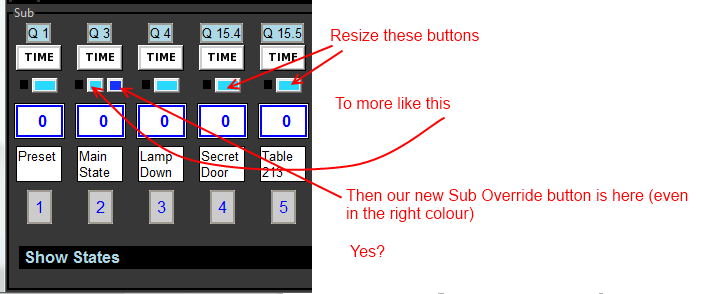
So normally, yes - but with the option button to allow them to be *in* the scene
(just as you have at the very top of the Subs window, a display button that lets you include or exclude the contents of a sub when recording a cue... (turns orange))
Réponse de colinc sur le sujet 3.0.12_b1
sl1200mk2 écrit: not yet....
Is it true that if you set a submaster in a disable recording state, you probably do not want this sub to be under Scene Master control.
in the other way, if you compose your cue with the submaster, you probably want them to be under the control of the scene master.
your thoughts?
Exactly as you say above
sl1200mk2 écrit: (but basically, I don't like the idea that submasters are part of X1. I think they're parallel to X1 and the scene master should act on X1. my 2cents...)
So normally, yes - but with the option button to allow them to be *in* the scene
(just as you have at the very top of the Subs window, a display button that lets you include or exclude the contents of a sub when recording a cue... (turns orange))
Connexion pour participer à la conversation.
Temps de génération de la page : 0.173 secondes