 Français
  English
 - Messages : 88
- Remerciements reçus 1
Résolution de problème : merci de consulter la FAQ et le Wiki
Aidez-nous à améliorer le contenu du Wiki et de la FAQ en les consultant. Le Wiki est mis à jour régulièrement et la FAQ permet une résolution rapide des principales embûches rencontrées. N'hésitez pas à nous faire parvenir vos suggestions d'amélioration sur le forum ou à éditer directement le Wiki ou la FAQ .
Steps insert as .1
- vbs
- Auteur du sujet
- Hors Ligne
Moins
Plus d'informations
il y a 13 ans 4 mois #6501
par vbs
Steps insert as .1 a été créé par vbs
Hi
How i work in DLight is:
* i record a show with lets say 54 steps.
* then i finish to make a separate Quelist that i normally print so i have it beside the computer.
But If the director change a scene lets say between scene 5 and 6 or want a step in between a scene,,,,, the problem is that all the numbers in the Quelist ail change an have to redo all the work again.
* this is why i really like to insert a .1 step so 4 becomes 4.1 and 5 will stay the same.
I think many people that work in theater and record shows would like this feather !!!
Is this possible to do?????
Thanks Vincent
How i work in DLight is:
* i record a show with lets say 54 steps.
* then i finish to make a separate Quelist that i normally print so i have it beside the computer.
But If the director change a scene lets say between scene 5 and 6 or want a step in between a scene,,,,, the problem is that all the numbers in the Quelist ail change an have to redo all the work again.
* this is why i really like to insert a .1 step so 4 becomes 4.1 and 5 will stay the same.
I think many people that work in theater and record shows would like this feather !!!
Is this possible to do?????
Thanks Vincent
Connexion pour participer à la conversation.
- colinc
- Hors Ligne
Moins
Plus d'informations
- Messages : 166
- Remerciements reçus 22
il y a 13 ans 4 mois - il y a 13 ans 4 mois #6506
par colinc
Réponse de colinc sur le sujet Steps insert as .1
Hello,
Yes it is possible, but you have to distinguish between 'STEPS' and 'CUES'. STEPS can only be added 'whole', but CUES can have any decimal part, so you can have Cue 3.14159 . CUES are then allocated to STEPS, and any CUE can go to any STEP.
so for example, you have:
STEP 0 CUE 0 TIME UP 0 TIME DOWN 0 ...
STEP 1 CUE 1 TIME UP 3 TIME DOWN 3 ...
STEP 2 CUE 2 TIME UP 3 TIME DOWN 3 ...
STEP 3 CUE 3 TIME UP 3 TIME DOWN 3 ...
Now your director says, 'I want another fade down before the final blackout in Cue 3...'
So - you make Cue 3 (STEP 3) 'Active' (Red Box around it). You type the keyboard shortcuts for 'INSERT', then 'STEP' (or 'Step' then 'Insert' if you use RPN mode), and you now have this :
STEP 0 CUE 0 TIME UP 0 TIME DOWN 0 ...
STEP 1 CUE 1 TIME UP 3 TIME DOWN 3 ...
STEP 2 CUE 2 TIME UP 3 TIME DOWN 3 ...
STEP 3 CUE 0 TIME UP 0 TIME DOWN 0 ... <- This is your new STEP, with NO CUE allocated
STEP 4 CUE 3 TIME UP 3 TIME DOWN 3 ... <- This was your old 'STEP 3' which was automatically re-numbered - but note - has kept its original CUE 3
You now create a new lighting state, and record it as, say, CUE 2.1. Then, with your new STEP 3 'active' (Red Box again) you LOAD (whatever your keyboard shortcut is) CUE 2.1 into STEP 3 and set your Fade, etc times
You should now have:
STEP 0 CUE 0 TIME UP 0 TIME DOWN 0 ...
STEP 1 CUE 1 TIME UP 3 TIME DOWN 3 ...
STEP 2 CUE 2 TIME UP 3 TIME DOWN 3 ...
STEP 3 CUE 2.1 TIME UP 3 TIME DOWN 3 ...
STEP 4 CUE 3 TIME UP 3 TIME DOWN 3 ...
Screenshot attached -
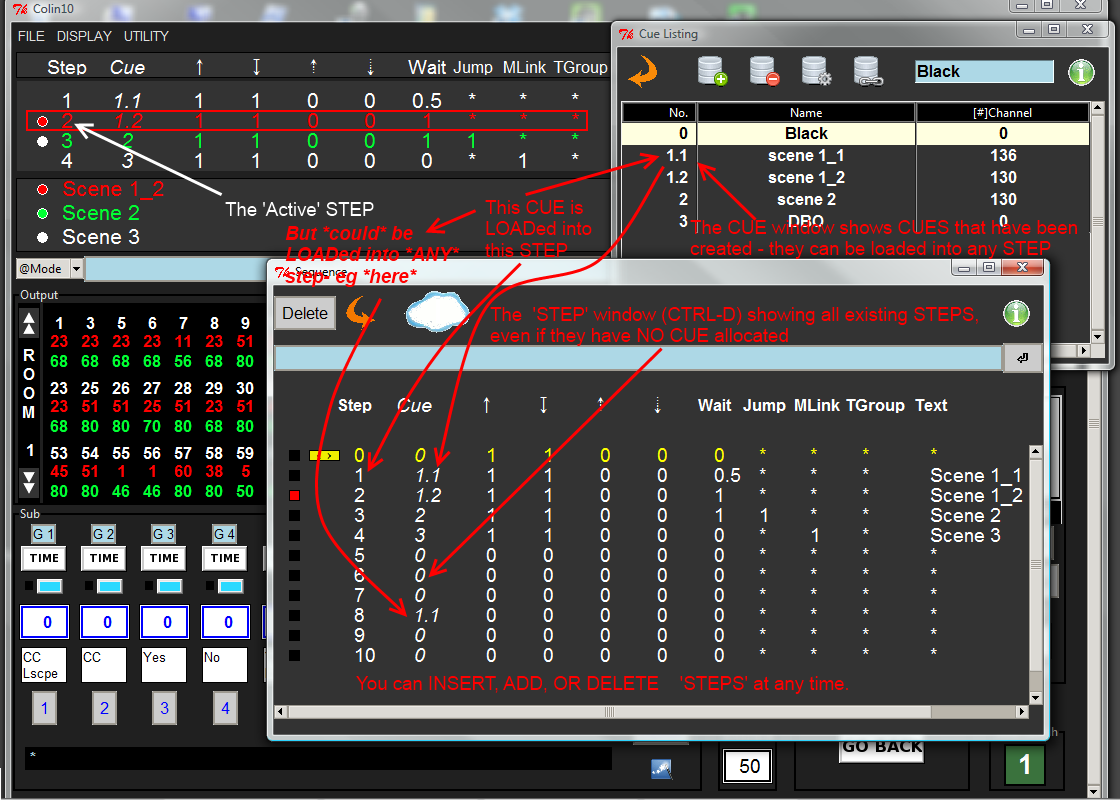
Hope this helps
Regards,
Colin
Yes it is possible, but you have to distinguish between 'STEPS' and 'CUES'. STEPS can only be added 'whole', but CUES can have any decimal part, so you can have Cue 3.14159 . CUES are then allocated to STEPS, and any CUE can go to any STEP.
so for example, you have:
STEP 0 CUE 0 TIME UP 0 TIME DOWN 0 ...
STEP 1 CUE 1 TIME UP 3 TIME DOWN 3 ...
STEP 2 CUE 2 TIME UP 3 TIME DOWN 3 ...
STEP 3 CUE 3 TIME UP 3 TIME DOWN 3 ...
Now your director says, 'I want another fade down before the final blackout in Cue 3...'
So - you make Cue 3 (STEP 3) 'Active' (Red Box around it). You type the keyboard shortcuts for 'INSERT', then 'STEP' (or 'Step' then 'Insert' if you use RPN mode), and you now have this :
STEP 0 CUE 0 TIME UP 0 TIME DOWN 0 ...
STEP 1 CUE 1 TIME UP 3 TIME DOWN 3 ...
STEP 2 CUE 2 TIME UP 3 TIME DOWN 3 ...
STEP 3 CUE 0 TIME UP 0 TIME DOWN 0 ... <- This is your new STEP, with NO CUE allocated
STEP 4 CUE 3 TIME UP 3 TIME DOWN 3 ... <- This was your old 'STEP 3' which was automatically re-numbered - but note - has kept its original CUE 3
You now create a new lighting state, and record it as, say, CUE 2.1. Then, with your new STEP 3 'active' (Red Box again) you LOAD (whatever your keyboard shortcut is) CUE 2.1 into STEP 3 and set your Fade, etc times
You should now have:
STEP 0 CUE 0 TIME UP 0 TIME DOWN 0 ...
STEP 1 CUE 1 TIME UP 3 TIME DOWN 3 ...
STEP 2 CUE 2 TIME UP 3 TIME DOWN 3 ...
STEP 3 CUE 2.1 TIME UP 3 TIME DOWN 3 ...
STEP 4 CUE 3 TIME UP 3 TIME DOWN 3 ...
Screenshot attached -
Hope this helps
Regards,
Colin
Dernière édition: il y a 13 ans 4 mois par colinc. Raison: added file
Connexion pour participer à la conversation.
- sl1200mk2
-

- Hors Ligne
Moins
Plus d'informations
- Messages : 11764
- Remerciements reçus 1073
il y a 13 ans 4 mois #6512
par sl1200mk2
nicolas
Réponse de sl1200mk2 sur le sujet Steps insert as .1
Hi guys,
thanx Colin for this answer!
another point is:
if you keep cue listing in an ascendent order, you can directly create cue that will be automatically inserted in the sequence.
for ex:
Step 1 -- Q 1
S2 -- Q2
S3 -- Q3
S4 -- Q4
if you adjust channel's level and type Q 3.14159 Record, your sequence will automatically be like that:
S1 -- Q1
S2 -- Q2
S3 -- Q3
S4 -- Q3.14159
S5 -- Q4
for these to work, the same Q should never appear twice in your sequence. If you have two identical cues, rename the second one.
++
thanx Colin for this answer!
another point is:
if you keep cue listing in an ascendent order, you can directly create cue that will be automatically inserted in the sequence.
for ex:
Step 1 -- Q 1
S2 -- Q2
S3 -- Q3
S4 -- Q4
if you adjust channel's level and type Q 3.14159 Record, your sequence will automatically be like that:
S1 -- Q1
S2 -- Q2
S3 -- Q3
S4 -- Q3.14159
S5 -- Q4
for these to work, the same Q should never appear twice in your sequence. If you have two identical cues, rename the second one.
++
nicolas
Connexion pour participer à la conversation.
- vbs
- Auteur du sujet
- Hors Ligne
Moins
Plus d'informations
- Messages : 88
- Remerciements reçus 1
il y a 13 ans 4 mois #6523
par vbs
Réponse de vbs sur le sujet Steps insert as .1
Hi,
Thanks for explaining this.
I was working all ready like this.
Its not the Que.,s that is my problem but the steps.
The steps nr is why i get confused with the que nr.
This wil give me a problem with the total overview, but if it is not possible to program .1 steps i have to learn to live with it.
For me are steps not necessary to see as a number, is there a way of making the steps not showing in the display
Vincent
Thanks for explaining this.
I was working all ready like this.
Its not the Que.,s that is my problem but the steps.
The steps nr is why i get confused with the que nr.
This wil give me a problem with the total overview, but if it is not possible to program .1 steps i have to learn to live with it.
For me are steps not necessary to see as a number, is there a way of making the steps not showing in the display
Vincent
Connexion pour participer à la conversation.
- colinc
- Hors Ligne
Moins
Plus d'informations
- Messages : 166
- Remerciements reçus 22
il y a 13 ans 4 mois - il y a 13 ans 4 mois #6528
par colinc
Yes please Nico... :whistle:
Regards,
Colin
Réponse de colinc sur le sujet Steps insert as .1
vbs écrit: Hi,
...
For me are steps not necessary to see as a number, is there a way of making the steps not showing in the display
Vincent
Yes please Nico... :whistle:
Regards,
Colin
Dernière édition: il y a 13 ans 4 mois par colinc. Raison: Added info
Connexion pour participer à la conversation.
- sl1200mk2
-
- Hors Ligne
Moins
Plus d'informations
- Messages : 11764
- Remerciements reçus 1073
il y a 13 ans 4 mois #6534
par sl1200mk2
nicolas
Réponse de sl1200mk2 sur le sujet Steps insert as .1
Hi,
it depends of how it's important for u because there's more work to do to eradicate bugs and start to publish moving heads/Leds interface....
if you can leave with that, it's a work that we can assign to ... later...
++
hidding Step Numbers (as a setup option) is something I can work on.For me are steps not necessary to see as a number, is there a way of making the steps not showing in the display
it depends of how it's important for u because there's more work to do to eradicate bugs and start to publish moving heads/Leds interface....
if you can leave with that, it's a work that we can assign to ... later...
++
nicolas
Connexion pour participer à la conversation.
Temps de génération de la page : 0.164 secondes